


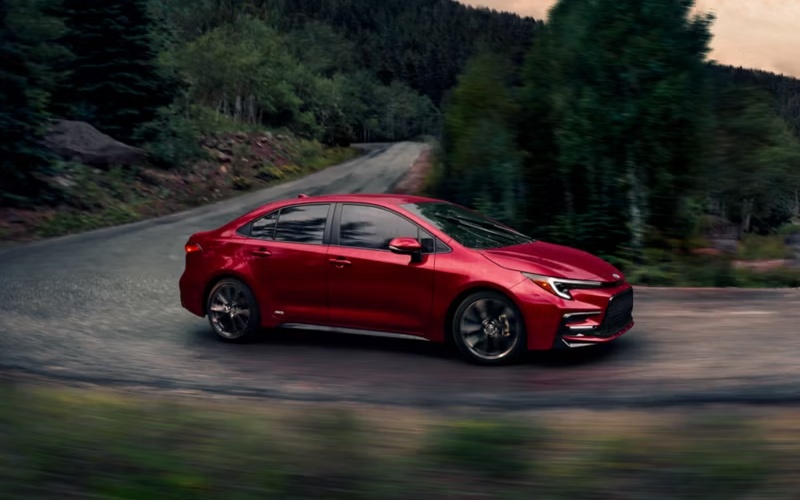
Venice Toyota – Why the 12.3-in Digital Gauge Cluster on the 2026 Toyota Corolla Helps Englewood, FL Drivers Stay Ahead
The 2026 Toyota Corolla is packed with smart technology, but one feature our local shoppers ask about most is the available 12.3-in. Digital Gauge Cluster. It is more than a larger screen—it is a command center that keeps your most important information in sight and your hands focused on the wheel. Around Englewood, FL—whether you are heading down SR 776, navigating Dearborn Street, or easing into evening traffic toward Manasota Key—this display helps reduce distraction and surface the data you actually need.
At a glance, you can prioritize driver-assist status, navigation prompts, audio, or efficiency readouts. The cluster works in tandem with the Toyota Audio Multimedia system to present concise, relevant info. The result is fewer glances to the center screen and more confidence as you filter lane guidance with Lane Tracing Assist or settle into a steady flow with Full-Speed Range Dynamic Radar Cruise Control from Toyota Safety Sense™ 3.0.
Below, we will unpack how the cluster is organized, what it shows, and how to tailor it for your daily routes around Englewood. You will also find tips to pair it with wireless Apple CarPlay® or Android Auto™ so your maps and media updates feel natural instead of noisy.
What the 12.3-in. Digital Gauge Cluster Shows
Corolla’s available 12.3-in. Digital Gauge Cluster can present priority cards, compact widgets, and full-width tiles so you can keep essential information front and center. The display is crisp in bright light and remains readable after sunset. Most drivers set primary tiles for driver-assist status and a secondary tile for directions or media. You can also keep tabs on trip details and efficiency trends without diving through menus.
- Navigation prompts: Turn-by-turn guidance and lane-level prompts for quick decisions.
- Driver-assist status: Clear indicators for Lane Tracing Assist, DRCC set speed, and following distance.
- Audio tile: See song info and quick-skip options without reaching for the center screen.
- Vehicle data: Trip distance, remaining range estimates, and drive mode cues at a glance.
This layout is intentionally simple. When your day takes you from McCall Road to beach parking near Englewood’s shoreline, you want cues that are timely and easy to absorb. The 12.3-in. cluster provides exactly that, without clutter.
How to Customize the Display
Personalizing the cluster is quick. Start parked with the engine on, then use the steering-wheel controls to scroll through layouts and select your preferred arrangement. You can switch priorities—like placing driver assists on the left and audio on the right—or opt for a centered navigation tile. Changes are saved to your profile, so each time you start the Corolla your preferred layout is ready.
- Select your main layout in settings.
- Choose primary and secondary tiles based on your drive—assist status, navigation, audio, or vehicle info.
- Adjust brightness to match ambient light, then save your profile.
One best practice: keep Driver Assist status visible on highway stretches toward I-75 so you can quickly confirm Lane Tracing Assist and DRCC settings at a glance. Around town, prioritize navigation and audio for simple turns and smooth pacing.
Pairing With Toyota Audio Multimedia
The 12.3-in. cluster is even more powerful when paired with the Toyota Audio Multimedia system and wireless smartphone integration. With Apple CarPlay® or Android Auto™ connected, you can view turn prompts on the cluster while the center touchscreen displays the full map. That means your eyes return to the road faster because the next maneuver and lane guidance are already in your line of sight.
- Natural voice: Say “Hey, Toyota” to control audio, calls, and navigation without fumbling for buttons.
- Clean handoff: Glance at the cluster for turns, then use the center screen for map context.
- Media clarity: See track info and adjust volume using steering-mounted controls.
Combined, these systems cut friction across every drive. You are not bouncing between screens for basics; you are maintaining situational awareness while your tech stays in step.
Frequently Asked Questions:
Can I switch between cluster layouts while driving?
You can toggle certain views using steering-wheel controls, but for safety we recommend setting your preferred layout while parked. The system is designed to minimize distraction and keep the most relevant information prominent during your drive.
Does the cluster still show important alerts if I am in an audio or navigation view?
Yes. Safety and vehicle alerts have priority and will surface as needed. Driver-assist indicators and warnings remain visible or will interrupt a tile to ensure you see critical information right away.
How does the Digital Gauge Cluster help on longer trips?
On longer stretches—like a weekend run from Englewood toward the interstate—you can keep DRCC details, following distance, and turn prompts visible at all times. That reduces scanning between screens and helps you maintain smooth, predictable pacing.
Will the cluster work seamlessly with both Apple CarPlay® and Android Auto™?
Yes. Wireless Apple CarPlay® and Android Auto™ are designed to hand off prompts and media info cleanly to the cluster. You can also use the center screen for deeper controls and map views while the cluster displays concise next steps.
What if multiple drivers share the Corolla?
Create individual driver profiles. Each profile can save preferred cluster layouts, brightness settings, and multimedia preferences. Switching drivers becomes simple, and everyone keeps their favored setup without reconfiguring each time.
Ultimately, the 12.3-in. Digital Gauge Cluster is about clarity and control. It reduces distraction, surfaces your most relevant information, and keeps your eyes up—vital on busy stretches of SR 776, neighborhood lanes near Dearborn Street, and coastal traffic headed toward Englewood Beach. It is the kind of thoughtful technology that feels second nature after a few drives, and it is a standout reason so many local shoppers put the 2026 Corolla on their shortlists.
At Venice Toyota, we can walk you through the display’s customization during a test drive and show you how it pairs with the rest of the Corolla’s tech stack. As a dealership serving Punta Gorda, Englewood, and Placida, we help local drivers tailor settings for their daily routes, from quick errands to highway commutes. If you are curious how this display looks and feels on the move, schedule time with our team and see how a smarter layout translates into calmer, more confident driving.
When you are ready to try it yourself, ask us to demonstrate both default and custom layouts, then take a loop that includes a mix of in-town and higher-speed roads. You will immediately notice how the right data, in the right place, changes the way you drive for the better—no gimmicks, just useful design working quietly in the background.
Request more 2026 Toyota Corolla information
Connect with us


- 2024 4Runner
- 2024 Corolla
- 2024 Crown
- 2024 Grand Highlander
- 2024 Highlander Hybrid
- 2024 RAV4
- 2024 Sequoia
- 2024 Tacoma
- 2024 Tacoma Hybrid
- 2024 Toyota Lineup
- 2024 Tundra
- Toyota Camry
- Toyota Corolla
- Toyota Dealer
- Toyota Land Cruiser
- Toyota RAV4
- Toyota Service
- Toyota Tacoma
- Toyota Tundra
- Uncategorized
- Venice Toyota Dealer