


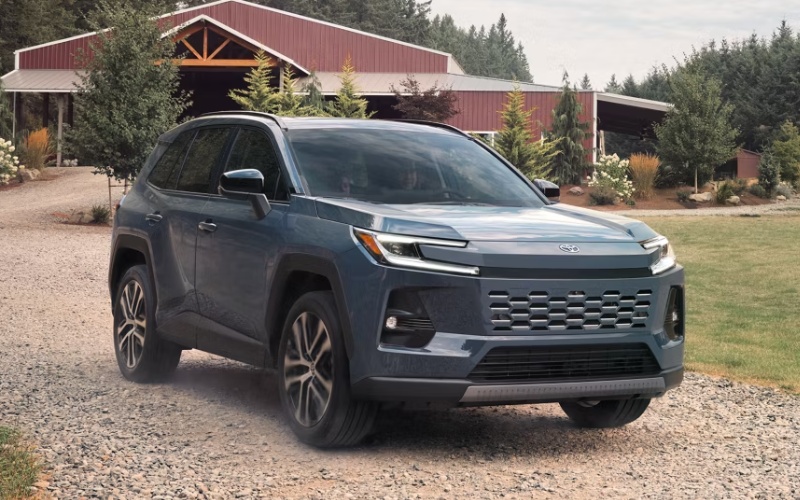
Venice Toyota – How does the 2026 Toyota RAV4 Drive Recorder work for daily driving near Bradenton, FL?
If you drive around Bradenton, you know the routine—tight downtown parking near Old Main Street, weekend crowds at the Riverwalk, and steady stop-and-go on Manatee Avenue, Cortez Road, and I-75. The 2026 Toyota RAV4 adds a smart layer of confidence to that everyday mix with Drive Recorder, an integrated feature that can capture video of your drive and help preserve important moments when you need documentation. At Venice Toyota, we see shoppers ask how it actually works in the real world, so we put together a practical guide on what Drive Recorder does, where it helps most around Bradenton, and how to get the most from it in your new RAV4.
What the RAV4 Drive Recorder is—and why it matters locally
Drive Recorder is built into the 2026 Toyota RAV4’s advanced technology suite and works with the vehicle’s onboard systems to record video clips that you can view and save. It is designed to be convenient—you do not have to install a separate dash camera, manage extra cords, or worry about blocking your view. For Bradenton-area drivers who split time between school pickups, barrier-island outings, and Lakewood Ranch commutes, having a recording of what happened in front of your vehicle can make a frustrating day much easier to navigate.
Think about scenarios like a minor parking-lot scrape at the Riverwalk or an abrupt stop on US-41. When a moment becomes unclear, having a video helps you recount the facts with confidence. Because Drive Recorder lives inside your 2026 RAV4, it is ready whenever you are—whether you are heading down the DeSoto Bridge or navigating a tight spot near Bradenton Beach.
How Drive Recorder works day to day
From the driver’s seat, you access Drive Recorder through the available 12.9-in. Toyota Audio Multimedia touchscreen. The interface is designed to feel familiar, so adjusting settings and reviewing clips is straightforward. You can start a manual recording when something ahead looks unpredictable or rely on the system’s ability to preserve footage around significant events. Once saved, clips can be reviewed on the screen, and you can store important files for future reference. For exact menu paths and storage options, we recommend reviewing your RAV4 Owner’s Manual or stopping by our showroom for a quick walkthrough.
Because the feature is integrated into the RAV4, it works alongside the rest of your technology without adding clutter. The standard 12.3-in. digital gauge cluster keeps your crucial drive data in view, and the available 12.9-in. multimedia display puts the Drive Recorder controls within easy reach. The combination feels seamless, which means you are more likely to use the tool when you need it most.
Set-up tips we recommend at Venice Toyota
When you take delivery, our team can help you personalize Drive Recorder so it aligns with your daily routes in and around Bradenton. We will walk you through the main settings, show you how to initiate and save a clip, and help you understand how to review footage. It takes just a few minutes and builds confidence quickly.
- Start with the touchscreen and locate Drive Recorder in the settings or apps menu.
- Familiarize yourself with the option to start and save a clip while you are safely parked.
- Practice reviewing a saved clip on the 12.9-in. display so you know what to expect.
- Ask our team to demonstrate how Drive Recorder works alongside Toyota Safety Sense™ 4.0 (TSS 4.0) so you understand each feature’s role.
These simple steps make Drive Recorder feel second nature—useful whether you are navigating IMG Academy traffic or making a run to Ellenton Premium Outlets.
How Drive Recorder complements your RAV4 safety and convenience tech
Drive Recorder is not a driver-assist system—it documents what is happening; it does not control the vehicle. Your active confidence still comes from Toyota Safety Sense™ 4.0 (TSS 4.0). That suite is designed to support you with features that can help with awareness and decision-making. When you add Drive Recorder to that foundation, you get both real-time assistance from TSS 4.0 and the peace of mind of having video clips you can review later.
The 2026 RAV4 also brings other helpful tools for our area. Available Traffic Jam Assist can help in stop-and-go situations on controlled-access highways at low speeds, and available Advanced Park can make backing into a tight space near the farmers market feel easy. Together with the clear visuals of the 12.9-in. Toyota Audio Multimedia system and the standard 12.3-in. digital gauge cluster, your technology works in harmony to simplify daily driving in Sarasota-Manatee.
Beyond documentation, the rest of the RAV4 package still shines for local needs. With up to 37.8 cu. ft. of cargo capacity, there is room for beach chairs, a soft cooler, and a pop-up tent. Available AWD adds confidence for unpaved trailheads, and with up to 3500 lbs. of towing capacity, you can bring along a small trailer for weekend projects. If you choose the Woodland grade, integrated Rigid Industries® LED fog lights are there to help enhance visibility when conditions shift.
Everyday best practices around Bradenton
Like any tool, Drive Recorder delivers the most value when you use it consistently and responsibly. We recommend making it part of your start-up routine, so you never wonder whether it is ready. Keep exterior camera areas clean for the clearest image—salt spray and road grime can build up faster when you spend time near the coast. And as always, follow local regulations and respect privacy when and where you review or share any footage.
If you are unsure about any setting or want us to tailor a quick tutorial to your commute, our team is happy to help. We can also review your RAV4’s Owner’s Manual with you and make sure your vehicle’s software is up to date during routine service visits. With ToyotaCare and Toyota Express Maintenance at our Venice service center, it is easy to keep your technology and your vehicle in sync.
- Drive Recorder adds clarity after a parking-lot incident near the Riverwalk.
- Manual recording is useful if traffic around the DeSoto Bridge turns unpredictable.
- Reviewing clips on the touchscreen is convenient before you leave a scene.
- Our team can demonstrate features so you are confident from day one.
The 2026 Toyota RAV4 was designed to feel intuitive—technology that simply works while you focus on the drive. Drive Recorder fits that promise. It is integrated, easy to access, and ready to help you keep your day moving, even when something unexpected happens.
Frequently Asked Questions:
Is Drive Recorder standard on the 2026 Toyota RAV4?
The 2026 RAV4 includes advanced technology features designed to empower your drive, including Drive Recorder. Availability can vary by configuration, so we will confirm equipment on the exact vehicle you choose and demonstrate how it works before you leave our showroom.
How do I view and save a clip from Drive Recorder?
You can access Drive Recorder through the available 12.9-in. Toyota Audio Multimedia display to review recent clips and save the ones you want to keep. For step-by-step menu paths and storage guidance, check your RAV4 Owner’s Manual or stop by Venice Toyota for a quick hands-on walkthrough.
Does Drive Recorder replace a separate dash camera?
For many drivers, yes—having an integrated system that works with your RAV4 is a convenient alternative to add-on cameras. Dedicated aftermarket dash cameras may offer niche features, but the RAV4’s built-in Drive Recorder keeps your cabin uncluttered and your controls in one place.
Will Drive Recorder drain my battery if I use it a lot?
Drive Recorder is designed to operate within the vehicle’s power-management strategy. As with any feature, use it as intended and review your Owner’s Manual for best practices. If you have questions about settings, we can tailor them to your driving routine and answer power-related questions during your delivery or service visits.
Does Drive Recorder affect Toyota Safety Sense™ 4.0 (TSS 4.0)?
No. Drive Recorder documents what is happening; TSS 4.0 provides driver-assist functions. They are complementary but serve different purposes. Always remain attentive and responsible for vehicle operation.
If you would like a live demo, visit us at Venice Toyota—just a short drive from Bradenton down US-41 or I-75. We will show you how Drive Recorder works on the 2026 Toyota RAV4, help you personalize the settings, and get you comfortable with the rest of your technology, from Toyota Safety Sense™ 4.0 (TSS 4.0) to the available 12.9-in. Toyota Audio Multimedia system. Ready to explore trims, including options like Woodland with integrated Rigid Industries® LED fog lights or the well-equipped XSE and Limited? Our team will match you to the right RAV4 and set you up for confident daily driving around Bradenton and beyond.
Request more 2026 Toyota RAV4 information
Connect with us


- 2024 4Runner
- 2024 Corolla
- 2024 Crown
- 2024 Grand Highlander
- 2024 Highlander Hybrid
- 2024 RAV4
- 2024 Sequoia
- 2024 Tacoma
- 2024 Tacoma Hybrid
- 2024 Toyota Lineup
- 2024 Tundra
- Toyota Camry
- Toyota Corolla
- Toyota Dealer
- Toyota Land Cruiser
- Toyota RAV4
- Toyota Service
- Toyota Tacoma
- Toyota Tundra
- Uncategorized
- Venice Toyota Dealer